Short answer: Better Proposals offers the best balance of speed, polish and price for freelancers sending a handful of proposals a month. PandaDoc fits if you regularly send contracts and quotes alongside proposals, and Bonsai or HoneyBook's all-in-one pricing can be cheaper than stacking three specialized tools. A proposal sitting unopened in a client's inbox is one of the most common ways freelance income quietly leaks away — and the numbers back that up: industry tracking from 2026 puts unopened email-attached PDF proposals at roughly 45%, while freelancers using dedicated proposal software (with tracking and e-signatures) report close rates around 36%, against a rough 20% industry average for proposals sent as plain email or PDF. Sales-focused tools like PandaDoc and Proposify are built around a team handing a signed deal off to a CRM — and priced for that team, not a solo budget. A freelancer needs something narrower and more affordable: a proposal that looks professional, gets signed quickly, and ideally turns into a contract and invoice without re-typing the same scope and pricing three times.
What actually matters for a freelance proposal
- Speed from blank page to sent — templates and reusable content blocks matter more than design depth you'll never use
- View tracking — knowing when a client opens a proposal (and which section they lingered on) tells you when to follow up
- E-signatures that are legally binding in your jurisdiction — covered by the same laws as the e-signature tools in our contract signing guide
- Deposit collection at the point of signature — the single biggest cash-flow feature, since a signed proposal with no deposit is still just a promise
Quick comparison
| Tool | Starting price | Deposit on signature | Invoicing/CRM included | Best for |
|---|---|---|---|---|
| Better Proposals | ~$13–19/user/mo | Yes | No | Best value, fastest to send |
| PandaDoc | Free e-sign; ~$19–35/user/mo for proposals | Yes | No (CRM integrations, not built-in) | Interactive pricing tables |
| Proposify | ~$25–49/user/mo | Yes | No | Deepest analytics on client engagement |
| Bonsai | ~$25/mo | Yes | Yes (proposals + contracts + invoicing) | All-in-one, fewer tools to juggle |
| HoneyBook | ~$19+/mo | Yes | Yes (CRM + invoicing, creative-industry focus) | Photographers, designers, other creatives |
| Agiled | Free plan available | Yes | Yes (proposals + e-signatures + invoicing + contracts) | Lowest-cost all-in-one starting point |
Better Proposals — the best value for most freelancers
Better Proposals focuses on one thing: fast, good-looking proposals that get signed. Its editor is opinionated — it guides you through a cover page, introduction, pricing table, and next steps — which is a genuine advantage if you don't want to make design decisions from scratch. It includes e-signatures and on-signature payment collection at a lower starting price than PandaDoc or Proposify. What it doesn't do is contracts, invoicing, or project management, so you'll still pair it with the tools from our invoicing and time tracking guides.
Best for: freelancers who send a moderate volume of proposals and want speed and polish without a steep learning curve.
PandaDoc — best if you also need contracts and quotes
PandaDoc's standout feature for freelancers with tiered offers is its interactive pricing block — a client can toggle optional add-ons or rush fees and watch the total update live, rather than requesting a revised PDF. It also handles contracts and quotes from the same editor, not just proposals. The free plan covers basic e-signatures only; proposal-specific features sit behind the Starter tier and up, which costs more than Better Proposals for a comparable feature set.
Best for: freelancers who send contracts and quotes as often as proposals, and want one editor for all three.
Proposify — best analytics, aimed at bigger volume
Proposify's template system and page-by-page engagement tracking are the most detailed of the group — useful if you're sending five or more proposals a month and want to know exactly which sections clients read closely before you call them. That level of detail comes at the highest per-seat price here, and like Better Proposals, it stops at the signature with no invoicing or project tools built in.
Best for: freelancers with high proposal volume who want to optimize based on real engagement data.
Bonsai and HoneyBook — the all-in-one alternative
Both Bonsai and HoneyBook take a different approach: instead of a dedicated proposal tool you pair with separate invoicing and contract software, they bundle proposals, contracts, invoicing, and light CRM into a single flat-rate subscription. The trade-off for that convenience is generally less proposal-specific polish than Better Proposals or Proposify offer — fewer templates, simpler tracking — but for a freelancer who'd otherwise be paying for three separate tools, the combined cost frequently comes out lower. HoneyBook in particular is built with creative freelancers (photographers, designers, event professionals) in mind, with workflow templates for that kind of client process.
Best for: freelancers who'd rather pay one flat subscription than stitch together a proposal tool, a contract tool, and invoicing software separately.
Agiled — the lowest-cost way to try the all-in-one approach
Agiled takes the same all-in-one bet as Bonsai and HoneyBook — proposals, e-signatures, invoicing, and contracts in one place — but starts with a genuinely usable free plan rather than a paid tier from day one, which makes it the lowest-risk way to test whether the connected-workflow approach fits before committing to a paid subscription anywhere else in this category.
Best for: freelancers who want to try an all-in-one proposal-to-invoice workflow at zero upfront cost before deciding whether to pay for a more polished dedicated tool.
The follow-up matters as much as the tool
Across the research on this category, one pattern shows up repeatedly: proposals followed up on within about an hour of being opened close at meaningfully higher rates than next-day follow-ups. Whichever tool you pick, turning on open notifications and actually acting on them is worth more than any template library.
A well-built proposal also does something less obvious than winning the job: it forces you to write from the client's problem instead of your own resume. The clearest version of that lesson came from two proposals sent the same week that landed completely differently. The first led with a list of past work and available skills — thorough, but entirely self-focused, and it went nowhere. The second opened by naming the client's actual problem before proposing anything: something close to "the current content has enough depth, but it's likely losing traffic to a mismatch with search intent — restructuring around intent first is what would recover that." That one line, placed before any mention of experience, was the only real difference between the two documents, and it's the one that got signed. The takeaway that stuck: a proposal isn't proof of capability, it's proof that you understood the problem — and once that's clear, thinner credentials underneath it still land, while a longer resume without it usually doesn't.
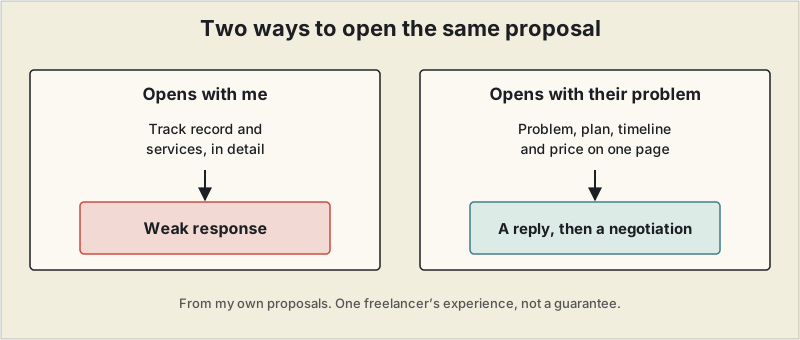
A related experience came with a first proposal to a new client. I described my track record and the services I offered in detail, and the response was thin. I sent it again as a single page covering the client's problem, the proposed solution, the timeline and the price, and the reply said it was now easy to see what they could ask me for. That led to an actual negotiation. The format is written up in the one-page freelance proposal.
Picking one
For most freelancers sending a handful of proposals a month, Better Proposals offers the best balance of speed, polish, and price. If you regularly send contracts and quotes alongside proposals, PandaDoc's shared editor is worth the higher cost. And if you'd rather not run a separate invoicing and contract tool at all, Bonsai or HoneyBook's all-in-one pricing is often cheaper in total than stacking three specialized subscriptions. If proposals aren't converting as often as you'd like, it may be less about the tool and more about where they're coming from — our look at freelance marketplaces beyond Upwork and Fiverr covers a few underused lead sources worth testing.
Pricing and feature tiers in this category change frequently. Confirm current plans directly on each provider's site before subscribing.
Frequently asked questions
Is there a truly free proposal software for freelancers?
Most dedicated proposal tools require a paid plan once you need e-signatures and payment collection built in, but a well-formatted document or template remains a genuinely free, if more manual, starting point.
What's the difference between proposal software and e-signature tools?
Proposal software is built around presenting scope, pricing, and terms persuasively before a client signs. E-signature tools (covered in our free e-signature guide) are narrower — they just handle the legally binding signature step on a document you've already written.
Can proposal software replace a separate contract?
Several tools let an accepted proposal convert directly into a binding e-signed agreement, which can replace a separate contract step for straightforward freelance work — though complex engagements often still warrant a dedicated contract reviewed by an attorney.
Do clients actually expect a formal proposal from a freelancer?
It depends on client type and project size. Smaller or repeat clients are often fine with an emailed scope and price, while larger clients and bigger-budget projects increasingly expect a formal, professional-looking proposal as a baseline.