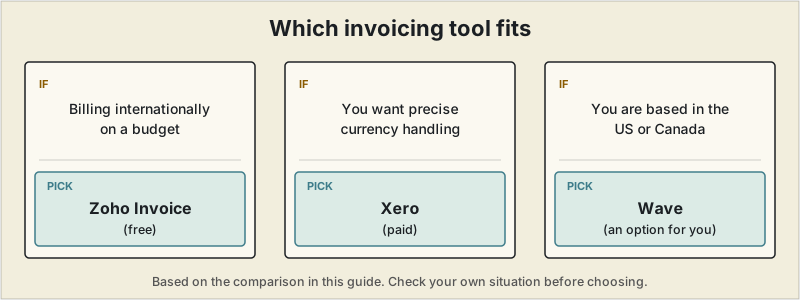
Short answer: for freelancers billing internationally on a budget, Zoho Invoice has the most complete free feature set. Xero is the strongest if you want precise currency handling and will pay for it, and Wave is an option only if you are based in the US or Canada.
 If you send invoices to clients in more than one country, a "best invoicing app" list built for domestic freelancers won't tell you what you actually need to know. Currency conversion, payment processing fees on cross-border transfers, and how an invoice looks to a client in Berlin or Tokyo matter more than a slick dashboard. This guide focuses specifically on invoicing tools for freelancers who bill internationally.
What matters when you invoice across borders
Before comparing tools, it helps to know which features actually move the needle for international billing:
- True multi-currency invoicing — not just displaying a currency symbol, but generating the invoice in the client's currency and converting it back to your base currency for your own records.
- Payment processing fees on foreign transactions — these often exceed the tool's subscription price over a year, so they deserve more attention than the sticker price.
- Local payment methods — ACH, SEPA, and bank transfer options frequently beat card payments on both speed and cost for larger invoices.
- Tax and VAT handling — especially relevant if you bill EU clients.
A recurring $1,200/month client once went quiet on payment for almost a month before I realized why: the contract specified "payment processed on invoice receipt," but I'd wrapped up that month's deliverables over Slack and never actually sent the invoice. Two weeks of silence felt like normal international payment lag, until a one-line reply — "Invoice not received" — made it obvious the delay was entirely mine. By the time I sent it, got it processed, and waited for the transfer to land, a payment that should have taken about two weeks took closer to six. Now invoice-sending is tied to delivery, not a separate step I trust myself to remember, and I keep a running list of what's been sent versus what's actually been paid.
If a payment is already late, here is the order I check things in.
Quick comparison
| Tool | Free plan | Multi-currency | Starting paid price | Best for |
|---|---|---|---|---|
| Wave | Yes, unlimited invoices | Basic | Free (fees on payments) | US/Canada-based freelancers only — see note below |
| Zoho Invoice | Yes, up to 5 clients | Strong, tax config included free | Free | Billing multiple countries |
| FreshBooks | No | Yes (Plus plan and above) | ~$23–43/month | Invoicing + light accounting |
| Xero | No | Yes, 160+ currencies, hourly FX updates | ~$29+/month | Scaling into a small business |
| Stripe Invoicing | No monthly fee | Yes | ~0.4% per paid invoice | Already using Stripe |
Zoho Invoice — best free option for billing internationally
Zoho made its invoicing product permanently free, and it's one of the more complete free options for cross-border billing. It includes multi-currency invoicing, tax configuration, a client portal, and recurring invoice automation without a subscription fee. The trade-off is an interface that feels dated next to newer tools, and it works best if you're comfortable navigating a slightly more complex product.
Best for: solo freelancers who bill clients in several currencies and don't want a monthly subscription.
Wave — free, but not actually an option for most international freelancers
Wave's core invoicing and bookkeeping features are genuinely free, and it's a strong product on paper. The important caveat for this specific article: since November 2020, Wave has restricted new signups to businesses based in the US or Canada — if you're freelancing from outside those two countries, you can't create a new Wave account at all, and Wave's own signup flow redirects you to Zoho Books instead. Existing Wave accounts opened before the change can generally keep running, but new international freelancers reading this guide won't be able to use it, which is worth knowing before spending time evaluating it further.
Best for: US- or Canada-based freelancers with low invoice volume who want no monthly cost. If you're outside North America, Zoho Invoice above is the closer free equivalent.
Xero — strongest multi-currency handling, at a price
Xero supports invoicing in more than 160 currencies with exchange rates that update hourly rather than daily, which matters if you bill in a currency that moves quickly. It also handles foreign exchange gain/loss tracking automatically — useful at tax time if a client pays weeks after you invoice and the exchange rate has shifted. This level of accuracy comes with a higher price tag than invoicing-only tools, and it functions more as full accounting software than a lightweight invoice generator.
Best for: freelancers who invoice regularly in several currencies and want the FX math handled for them.
FreshBooks — good middle ground
FreshBooks supports multi-currency invoicing starting on its Plus plan, and pairs it with expense tracking and basic accounting. It's a reasonable pick if you want something between a bare invoicing tool and a full accounting suite like Xero, though the entry-level plan restricts you to a limited number of billable clients.
Best for: freelancers who want invoicing and light bookkeeping in one place without Xero's complexity.
Stripe Invoicing — best if you're already using Stripe
If you already process payments through Stripe, its built-in invoicing tool adds multi-currency invoicing at a flat per-invoice fee rather than a monthly subscription. It's a narrower tool than the others here — no time tracking, no proposals — but it's efficient if payment collection is your main concern.
Best for: freelancers who just need to get paid across currencies without extra project management features.
The cost freelancers often miss
Subscription price is only part of the real cost. Payment processing fees compound quickly: a difference of even 1–2 percentage points on a $5,000 monthly invoice adds up to hundreds of dollars a year. For invoices over roughly $150–200, bank transfer or ACH options — where available — are usually far cheaper than card payments, even if cards are more convenient for the client. If you bill EU, UK, Australian, or Canadian clients regularly, check that your chosen tool supports local payment rails (SEPA, BACS) rather than routing everything through a card network. If you've narrowed things down specifically to FreshBooks or QuickBooks, our dedicated FreshBooks vs QuickBooks comparison goes deeper on that specific decision. US- and Canada-based freelancers specifically weighing Wave against FreshBooks should see our dedicated Wave vs FreshBooks comparison for the details.
Picking one
For most freelancers billing internationally on a budget, Zoho Invoice offers the most complete free feature set. If you want the most accurate currency handling and don't mind paying for it, Xero is the strongest option. Wave is worth a look only if you're based in the US or Canada yourself — it stopped accepting new signups from anywhere else in 2020, which makes Zoho Invoice the more broadly applicable free option for this specific article's audience. If PayPal or a marketplace's built-in payout is currently your default for cross-border clients, it's worth comparing against the dedicated options in our international payment platforms guide — the fee difference is usually larger than it looks.
This article is for general informational purposes and isn't tax, legal, or financial advice. Pricing and features change frequently — always confirm current details on the provider's website before subscribing.