Short answer: for a handful of contracts a month, the free tiers of SignWell or Signaturely cover the need. If you regularly exceed three documents a month, OpenSign's free cloud plan or self-hosted option removes the ceiling, and DocuSign is for clients whose own compliance requirements call for it. Getting a contract signed before starting work is one of the simplest ways a freelancer protects themselves, but DocuSign's pricing — built around sales teams processing hundreds of contracts a month — makes it feel like overkill for a two-page freelance agreement. The good news: electronic signatures are legally binding under the same laws (the US ESIGN Act, the EU's eIDAS regulation, and equivalent rules elsewhere) no matter which tool produces them, so a free tool holds up exactly as well as an expensive one for a standard freelance contract. If you just need the exact steps for signing a single document right now, see our step-by-step guide to signing a contract online for free — this article is more about picking a tool for ongoing use.
The cost of skipping e-signature entirely showed up on a contract handled the old way: print, sign, scan, email, only for the client to come back twice — a signature in the wrong field, a missing initial on one page — before a key contact went on leave for three business days waiting on a reply. Total time to a signed contract: about eight days, on a $2,000/month engagement where a week of delay was a real, calculable cost to cash flow. The next contract went through an e-signature tool instead — fields set up once, a link sent, both sides notified automatically the moment it was signed — and closed within 24 hours. The lesson wasn't about the document at all; a contract stopped being "something to write" and became "a workflow to remove friction from," and print-scan-mail is exactly the kind of friction that turns a signature into a bottleneck, especially across time zones.
What actually matters for a freelance contract
- A real audit trail — timestamp, signer email, and IP address recorded automatically, which is what makes a signature defensible if a dispute ever comes up
- Enough free documents per month for your actual volume — most freelancers send far fewer than they think
- Reusable templates, so you're not rebuilding the same contract from scratch every time
- No account required for the client — friction at the signing step is the easiest way to delay getting started on a project
Quick comparison
| Tool | Free plan | Templates on free plan | Best for |
|---|---|---|---|
| SignWell | 3 documents/month, 1 sender | 1 template | Simple, fastest signing experience |
| Dropbox Sign | 3 documents/month | Limited | Freelancers already using Dropbox |
| Signaturely | 3 signature requests/month | Limited | Clean interface, easy for clients to sign |
| OpenSign | Unlimited (cloud, basic features) | Yes | Highest free-tier document volume |
| DocuSign | 5 envelopes (Personal plan, paid only) | Limited | Clients in regulated or enterprise industries |
SignWell — the simplest signing experience
SignWell (formerly Docsketch) is built specifically to be fast to set up and easy for a client to sign — no account required on their end, and a document can go from upload to sent in a few minutes. The free plan caps out at 3 documents a month with one sender, which is enough for most solo freelancers sending occasional contracts, but tight if you're signing a new client every week.
Best for: freelancers who want the fastest, least confusing signing experience for a client who's never used an e-signature tool before.
Dropbox Sign — a solid pick if you're already in Dropbox
Dropbox Sign (formerly HelloSign) offers a comparable free tier — 3 documents a month — with the advantage of tying directly into Dropbox if that's already where your contracts and client files live. Outside of that integration, it's functionally similar to SignWell, so the choice mostly comes down to which ecosystem you're already using.
Best for: freelancers who already store client files in Dropbox.
Signaturely — clean and straightforward
Signaturely covers the same core ground as SignWell and Dropbox Sign — a free plan with a small number of monthly signature requests, reusable templates, and a signing flow that doesn't require the client to create an account. It doesn't have the compliance depth of DocuSign, but for a standard freelance service agreement or NDA, that depth isn't something you need.
Best for: freelancers who want a clean, no-frills tool and don't need enterprise-grade compliance features.
OpenSign — the highest free-tier volume, with a self-hosting option
OpenSign is an open-source e-signature tool with a genuinely generous free cloud plan — unlimited signatures with basic features, rather than a 3-document cap. Freelancers with more technical comfort can also self-host it entirely for free, which appeals specifically to anyone who wants signed contracts staying on infrastructure they control rather than a third party's servers. The interface is less polished than the paid-first tools above, which is the trade-off for the higher free volume.
Best for: freelancers who send more than 3 contracts a month and want to stay on a free plan.
DocuSign — still worth it in specific cases
DocuSign's name recognition and compliance depth matter most when you're working with larger companies or regulated industries (finance, healthcare, legal) where a vendor's compliance checklist may specifically ask which e-signature platform you use. For a typical freelance service agreement, this level of documentation is unnecessary — but if a client's procurement process specifically expects it, DocuSign remains the safest choice precisely because of how widely recognized it is.
Best for: freelancers whose clients are large enterprises or in regulated industries with specific vendor compliance requirements.
What I use for overseas contracts
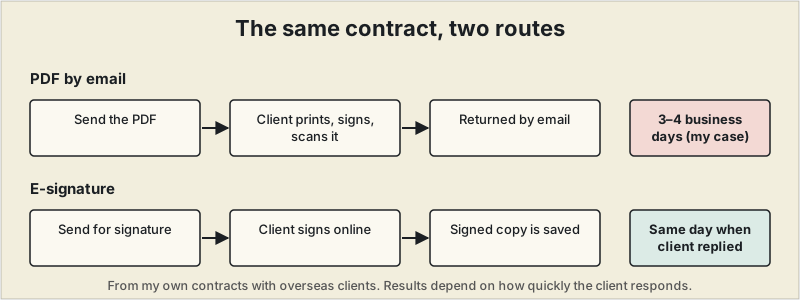
I use Dropbox Sign for service agreements with overseas clients. Before that I sent contracts as PDFs by email, and getting one signed and returned could take three to four business days. Since switching, projects where the client replied promptly have been signed the same day I sent the contract, and I could start work once it was signed instead of waiting on documents going back and forth.
Two things I paid attention to while using it: how many contracts the free plan lets you send, and how signed documents are stored and managed. With only one or two contracts a month a low-priced plan may be enough, but if you handle contracts continuously, check the send limits and audit-trail features before you commit.
Where to start
For most freelancers sending a handful of contracts a month, SignWell or Signaturely's free tiers cover the need with no cost and minimal setup. If you regularly exceed 3 documents a month, OpenSign's free cloud plan or self-hosted option removes that ceiling entirely. Reach for DocuSign specifically when a client's own compliance requirements call for it — not by default. A signed contract pairs naturally with the tools in our proposal software guide — several of the platforms there handle the proposal and the signature in the same step.
This article is for general informational purposes and isn't legal advice. Requirements for what makes a contract enforceable vary by jurisdiction — confirm what applies to your situation with a qualified professional if you're unsure.
Frequently asked questions
Are free e-signature tools legally binding?
Yes — in the US, the ESIGN Act and UETA give electronic signatures the same legal standing as ink signatures for most contracts, including freelance agreements, regardless of whether the tool used is free or paid.
What's the catch with free e-signature plans?
Free tiers almost always cap the number of documents you can send per month, often to three to five — fine for occasional freelance contracts, restrictive if you're sending several a week.
Do I need a lawyer to draft a freelance contract before e-signing it?
Not necessarily for straightforward, lower-stakes engagements — many freelancers use a solid template covering scope, payment terms, and IP ownership. A one-time attorney review is worth it for larger contracts or unusual terms.
Can I use a free e-signature tool for international clients?
Most major tools are recognized as legally valid across most countries with electronic-signature laws, but rules vary by jurisdiction — worth a quick check if a specific client's country has unusual requirements.