Short answer: for most freelancers, Zoho Mail's free tier is the easiest way to get a real yourname@yourbusiness.com address. If you already live in Google's or Microsoft's ecosystem, paying for Workspace or 365 buys a smoother setup, and Proton Mail is for when privacy is the deciding factor. I use Google Workspace myself, and describe what setting it up involved below. A free Gmail or Outlook address works fine technically, but a growing body of freelancer and small-business advice keeps landing on the same observation: a custom-domain email address reads as more established to a client comparing multiple freelancers, even when the actual work is identical. The good news is this is one of the cheapest professional upgrades available — a domain costs roughly $10-15 a year, and several providers offer genuinely usable email hosting for free or close to it.
What matters for a freelancer's business email
- Whether a custom domain is included or requires separate purchase — some providers bundle a domain, most require buying one separately from a registrar
- Real free-tier availability, not just a trial — several providers offer a genuinely permanent free tier for a small number of users
- Calendar and light collaboration tools, if you want scheduling or shared docs in the same ecosystem rather than a separate subscription
- Migration ease if you're moving years of existing email history from a personal account
Quick comparison
| Provider | Free tier | Starting paid price | Storage | Best for |
|---|---|---|---|---|
| Zoho Mail | Yes, up to 5 users, 1 domain | ~$1/user/month | 5GB/user | Best free option, budget-conscious freelancers |
| Google Workspace | No | ~$7/user/month | 30GB+ | Freelancers who want full Docs/Drive/Meet integration |
| Microsoft 365 | No | ~$6/user/month | 50GB+ | Freelancers whose clients are Microsoft-based businesses |
| Proton Mail | Limited free (no custom domain) | ~$4-8/month for custom domain | 15GB+ | Privacy-focused freelancers |
Zoho Mail — the strongest free option
Zoho Mail's free tier supports up to 5 users on one custom domain with 5GB of storage each — a genuinely complete business email setup at no ongoing cost beyond the domain itself. It includes a clean web interface plus Zoho's own Calendar and lightweight productivity apps, and connects directly to Zoho Invoice, Zoho Books, and Zoho CRM if you're already using those (covered in our invoicing and CRM guides). Paid plans are inexpensive if you outgrow the free tier's storage or user limit.
Best for: freelancers who want a genuinely professional setup without an ongoing subscription cost.
Google Workspace — best for deep Google integration
Google Workspace is essentially Gmail's interface and reliability with your own domain attached, plus real Docs, Sheets, Drive, and Meet integration rather than the free consumer versions. For a freelancer who already lives inside Google's ecosystem for documents and file sharing (see our cloud storage guide), that continuity is worth the monthly cost. There's no free tier — the lowest Starter plan runs roughly $7/user/month, and a domain still needs to be purchased separately.
Best for: freelancers who want the exact Gmail experience they already know, with a custom domain and the full Google productivity suite attached.
What setting up Google Workspace actually took
I use Google Workspace for my own business address, at about ¥900 per user per month. I set it up when I wanted a proper work contact, separate from my personal Gmail, so that client messages and invoice-related email would be easier to keep track of.
The part that slowed me down was DNS. I had assumed that once the domain was bought, the address would just work. In practice the domain needed MX records pointed at Google, and I had to understand SPF and DKIM, the email authentication records, before I trusted it. Reading up on the settings and sending test messages took about two hours in total.
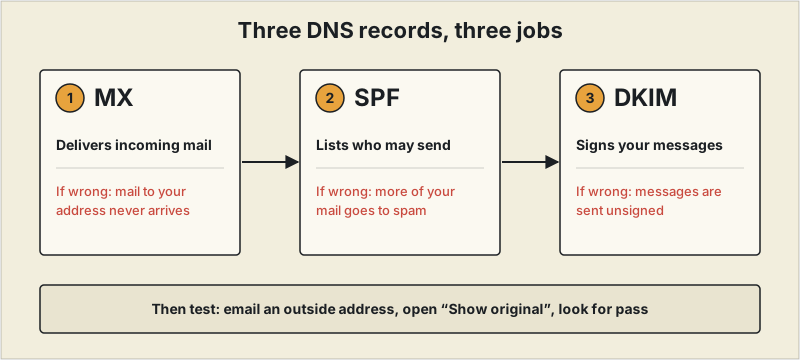
It did not make inquiries jump. I did not see more people getting in touch after the switch. What changed was smaller: it became easier to present a business contact to someone I was writing to for the first time than a free personal address. At roughly ¥900 a month, that is a cost I find reasonable for keeping work contact in one place, but it is a tidy-up, not a growth lever. If the address isn't working after setup, see what to check: MX, SPF and DKIM. For a short decision guide, see is a custom domain email worth it?.
Microsoft 365 — best if clients are Microsoft-based
Microsoft 365 makes the most sense for freelancers whose clients are themselves running on Microsoft's ecosystem — Word, Excel, Outlook, Teams — since file compatibility and calendar invites tend to work more smoothly end-to-end. Pricing is similar to Google Workspace's entry tier, with no free option.
Best for: freelancers whose client base skews toward larger, more traditionally corporate companies already standardized on Microsoft tools.
Proton Mail — best for privacy-focused freelancers
Proton Mail's core appeal is end-to-end encryption and Swiss data protection law, which matters if you handle sensitive client communications and want the strongest available privacy guarantees on your inbox itself. Its free tier doesn't include custom domain support — that requires a paid plan, typically in the $4-8/month range depending on the number of addresses needed.
Best for: freelancers who specifically want the strongest privacy posture on their email, and are willing to pay for the custom domain that comes with it.
Don't forget the domain itself
None of the providers above (except Zoho and Google Workspace in some bundle promotions) include a domain automatically — you'll typically register one separately through a registrar like Namecheap, Google Domains successor Squarespace Domains, or Cloudflare, generally $10-15/year for a standard .com. If you already have a portfolio site from our website builder guide, using the same domain for both your site and email reinforces the same professional identity in both places.
The deliverability problem nobody warns you about
A brand-new domain has no email sending history, and mail providers (Gmail and Outlook especially) are more likely to flag messages from an unfamiliar domain as spam until it builds a track record. This is a real, specific risk when switching from a personal Gmail address (which has years of sending reputation) to a fresh yourname@yourbusiness.com — your first invoices and proposals from the new address are statistically more likely to land in a client's spam folder than the ones you used to send from Gmail.
Two technical records reduce this risk meaningfully: SPF and DKIM, both of which authenticate that your domain's email is actually coming from your provider's servers rather than being spoofed. Every provider covered above (Zoho Mail, Google Workspace, Microsoft 365, Proton Mail) provides setup instructions for these during onboarding — it's a 10-15 minute DNS configuration step, not an ongoing task, and skipping it is one of the more common reasons a new business email address underperforms in the first few months.
A practical transition plan
Rather than switching cold, most freelancers do better keeping the old personal address active as a forward or secondary inbox for a few months while the new domain builds sending reputation, and updating invoicing and proposal tools to the new address first (since those are the messages most sensitive to landing in spam) before migrating lower-stakes correspondence.
When it's not worth switching yet
If you've been freelancing under a personal Gmail address for years and have an established client base who already knows and trusts that address, switching isn't free — old email threads, calendar invites, and any client who has your address memorized all need to catch up. For a very early-stage freelancer with no clients yet, this is close to a pure upgrade with no real downside. For someone three years in with a full inbox history, it's worth weighing the credibility gain against the actual migration hassle, and a reasonable middle path is starting to use the new address for new clients while letting the old one wind down naturally rather than a hard cutover.
A migration detail worth knowing upfront
Whichever provider you choose, forward your old address to the new one for at least a few months rather than closing it immediately — invoices, contracts, and account recovery emails tied to the old address will keep arriving for longer than you'd expect, and a hard cutoff risks missing something that actually mattered.
What actually triggered a switch off a personal Gmail address wasn't reading advice about it — it was a prospective overseas client asking directly, "Do you have a business email?" partway through a pitch. Work had been won under the Gmail address before that point, so it clearly wasn't disqualifying on its own, but it was the first time the address itself registered as a signal being evaluated rather than a neutral detail. After switching to a domain-matched address — and updating outreach materials, the portfolio site, and invoices to match — the more noticeable change wasn't in client responses, it was in how sending an invoice or a pitch from a proper business address felt: less like a side project, more like something being run deliberately. The whole setup (domain plus email hosting) came to roughly $65-70 a year. It didn't function as some kind of credibility shortcut — the actual work and the proposal still carried the deal — but as a small, cheap piece of infrastructure that made everything else feel more like a real business.
How to choose
For most freelancers, Zoho Mail's free tier is the easiest way to get a real yourname@yourbusiness.com address without an ongoing bill. If you're already deep in Google's or Microsoft's ecosystem for documents and calendars, paying for Workspace or 365 buys you a smoother, fully integrated setup. Reach for Proton Mail specifically when privacy is the deciding factor, not cost.
Pricing and plan details for email hosting change frequently. Confirm current details on each provider's site before choosing.
Frequently asked questions
Is a custom domain email worth it for freelancers?
Yes for most freelancers who already have paying clients or expect to within a few months — the cost is roughly $65-70/year all in, and the main realistic downside is a short deliverability dip while the new domain builds sending reputation. It matters least for someone with zero clients yet and no pitches in flight, where there's no existing reputation to protect either way. In my own case it did not bring a visible jump in inquiries; the benefit was a clearer business contact point, at about ¥900 per user per month for Google Workspace.
What's the best affordable email for freelancers?
Zoho Mail's free tier — it supports a custom domain, up to 5 users, and 5GB of storage each at no ongoing cost beyond the ~$10-15/year domain itself, which is as close to a complete professional setup as exists without a subscription.
What are the most reliable professional email services for freelancers?
Zoho Mail, Google Workspace, Microsoft 365, and Proton Mail all meet a professional reliability bar — the real differentiator between them is ecosystem fit (Google or Microsoft tools you already use) and budget, not uptime or deliverability, which are comparable across all four.