Short answer: if mail to your new domain address never arrives, or your messages land in spam, one of three DNS records is usually missing or wrong: MX (where incoming mail is delivered), SPF (which servers may send as your domain), or DKIM (a signature that shows the message really came from you). Check them in that order, then send a test email to confirm.
What I assumed, and what it actually took
When I set up Google Workspace for my own business address, I assumed that once the domain was bought, the address would simply work. It didn't. The domain needed MX records pointing at Google, and I had to understand SPF and DKIM, the email authentication records, before I trusted the setup. Reading up on the settings and sending test messages took about two hours in total.
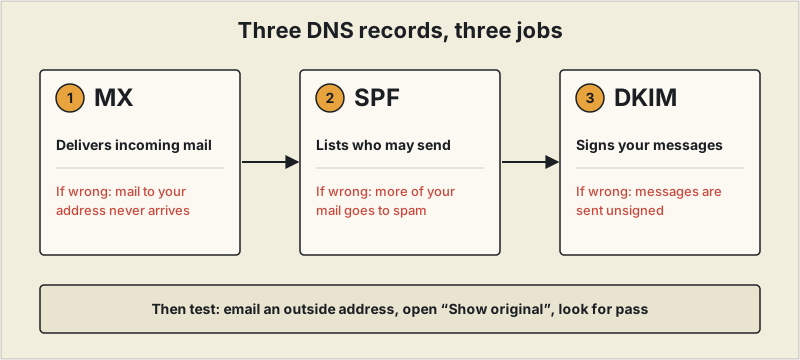
Check them in this order
- MX records (incoming mail). They tell the internet which servers receive mail for your domain. If they are missing or wrong, mail sent to your address never arrives. Copy the values from your email provider's admin console rather than from a third-party page, because they differ by provider.
- SPF (who may send). A TXT record listing the servers allowed to send mail as your domain. A domain should have only one SPF record. If you add a second one instead of editing the first, receivers can treat both as invalid.
- DKIM (proof it is you). Your provider generates a key, you publish it in DNS, and then you switch signing on in the admin console. Publishing the record without turning signing on is a common half-finished setup.
Then test it properly
Send a message from your new address to an outside account (a personal Gmail works), and send one back. In Gmail, open the received message, choose "Show original," and look for SPF and DKIM marked as pass. A fail there tells you which record to fix.
If nothing seems to change
- Edit DNS where it is actually served. If your domain's nameservers point to another service, changes made at the registrar are ignored. Make them at whichever service the nameservers point to.
- Allow time. DNS changes can take anywhere from a few minutes to several hours to reach every receiver.
- Next step, once these pass: a DMARC record tells receivers what to do with messages that fail SPF or DKIM. It is optional for a small sender, but worth adding after the first two are working.
For what to choose before this step, see our guide to professional email for freelancers.
Where my own setup went wrong
I bought the domain from an ordinary registrar and managed DNS on Cloudflare, so at first I wasn't sure where to change what. I entered the MX, SPF and DKIM records my email provider told me to use. My first test failed SPF. The cause was that I had left the existing SPF record in place and added a second one; once I understood that SPF is not something you add more of, I merged them into a single record. DKIM also took a while to take effect after I added it, so I now wait for DNS to update before testing, instead of sending a test right after the change.
This reflects one setup on one provider. Exact record values and menu names differ by provider and change over time, so follow your provider's current setup instructions.
Frequently asked questions
Why does my new domain email not receive anything?
Most often the MX records are missing or wrong, or the DNS changes were made somewhere the domain's nameservers don't point to. Copy the MX values from your email provider's admin console, and make the change at whichever service your nameservers actually use.
Do I need SPF and DKIM for a small freelance business?
Mail can flow without them, but messages without authentication are more likely to be treated as suspicious and sent to spam. Setting up SPF and DKIM is a small amount of work compared with explaining to a client why your email went missing.
How long do DNS changes take?
From a few minutes to several hours before every receiver sees the change. If a record still looks wrong after that, recheck where the domain's nameservers point.