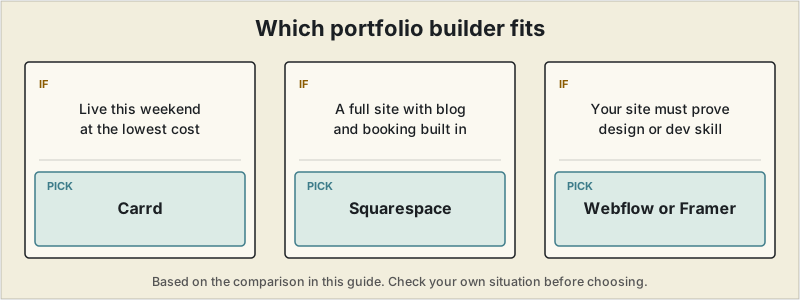
Short answer: Carrd if you want a portfolio live this weekend at the lowest cost; Squarespace if you want a full site with a blog and booking built in and don't mind spending a day; Webflow or Framer when your own site needs to prove your design or development skill.
 A freelance portfolio has one job: convince someone to reach out. That's a narrower problem than "build a website," which is exactly why the general-purpose advice to "just use Squarespace" or "just use WordPress" leads a lot of freelancers to spend a weekend on a site they never finish. If you're looking for the best website builder for freelancers specifically — not a full business site — this guide compares builders on how well they fit a portfolio's actual job: showing proof of work and making it easy to get in touch, not how many features they have.
What a portfolio site actually needs
- A fast path from zero to live — a portfolio that takes three weekends to build is a portfolio that doesn't exist yet
- Case-study depth appropriate to your work — a single scrolling page is plenty for a copywriter or consultant; a designer or developer often needs dedicated project pages
- A domain you own — a free-tier subdomain (yourname.carrd.co) works to start, but a real domain reads as more established once you can afford the ~$12/year
- Low ongoing maintenance — the whole point is spending less time on the site and more time on billable work
Quick comparison
| Tool | Starting price | Structure | Setup time | Best for |
|---|---|---|---|---|
| Carrd | Free; Pro from $9-19/year | One page only | 30–60 minutes | Fastest, cheapest "hire me" page |
| Squarespace | ~$16-23/month | Full multi-page site | 4–8 hours | Photographers, designers, consultants who also want a blog/store |
| Webflow | Free to build; paid from ~$14/month to publish | Full multi-page site, near-code control | 8–20 hours | Developers and designers who want pixel-level control |
| Framer | Free to build; paid to publish | Full multi-page site | 8–15 hours | Design freelancers who want their site to double as a design sample |
Carrd — the fastest, cheapest option
Carrd builds exactly one thing well: a single, fast-loading page. For a freelancer whose portfolio just needs to state who you are, show a few proof points, and make contacting you effortless, that constraint is a feature, not a limitation — there's no template to get lost customizing, no multi-page navigation to plan. Pro plans start around $9–19/year (not per month), and even the free tier is usable, just with Carrd branding attached. The trade-off is real: no multi-page case studies, no blog, and inquiry forms are basic.
Best for: copywriters, consultants, and developers who mainly need a clean "here's what I do, here's how to reach me" page rather than a portfolio with deep case studies.
Squarespace — best if you want a full site, not just a page
Squarespace remains the standard pick for freelancers who want their portfolio to double as a full business site — a blog, a booking page (via its built-in Acuity integration), maybe a small shop for templates or presets. Its templates are genuinely strong for visual work, and no coding is required at any point. The cost is real setup time (plan for a half-day to a full day, not an hour) and a higher monthly price than a single-page builder.
Best for: photographers, designers, and consultants who want a portfolio, blog, and booking system in one place and are willing to spend a day setting it up.
Webflow — best for developers and designers who want real control
Webflow occupies an unusual spot: a visual, no-code editor that outputs clean, genuinely production-grade HTML and CSS underneath. For developer and designer freelancers specifically, that matters twice over — you get pixel-level control over the design, and a Webflow build can double as a work sample in itself, since sophisticated clients can tell the difference between a templated site and a custom one. The learning curve is the real cost; expect to spend meaningfully longer than with Carrd or Squarespace before a first version is live.
Best for: freelance developers and designers who want their own site to demonstrate the same skill they're selling to clients.
Framer — closest Webflow competitor, with an easier learning curve
Framer targets similar ground to Webflow — visual, near-code-level design control — with an interface that's noticeably easier to pick up, especially for anyone already comfortable in Figma. For design freelancers, a well-built Framer site is a legitimate portfolio piece in its own right, since Framer sites tend to read as more current and polished than Squarespace templates. It has fewer advanced features than Webflow once you're past the basics, which is a fair trade for most portfolio use cases.
Best for: design freelancers who want Webflow-level polish with a shorter path to a finished site.
A transparency note
SoloStack itself runs on Next.js and Vercel rather than on a site builder. The comparison on this page is based on each provider's pricing and documentation, as described on our methodology page, not on long-term use of each builder.
The real trade-off
The pattern across every option here is the same: speed and simplicity on one end (Carrd), full control and polish on the other (Webflow, Framer), with Squarespace sitting in the middle as the "full site, still no code" option. The right call depends less on budget and more on how much of your actual selling point is the site itself — a developer's site is part of the pitch; a consultant's site mostly just needs to exist and look credible. If you've narrowed things down specifically to Squarespace or Wix, our dedicated Squarespace vs Wix comparison goes deeper on that decision.
Which one fits
If you want a portfolio live this weekend for the lowest possible cost, Carrd is hard to beat. If you want a full site with a blog and booking built in and don't mind spending a day on it, Squarespace remains the safe default. Reach for Webflow or Framer specifically when your own site needs to double as proof of your design or development skill, not just a place to list it. Once your site is live on a real domain, use that same domain for your business email address too — it reinforces the same professional identity in both places.
Pricing and plan structures change frequently across website builders. Confirm current details on each provider's site before choosing.
Frequently asked questions
What's the cheapest way to build a freelance portfolio website?
Carrd is the cheapest genuinely usable option — free for a single-page site, with a custom domain and forms available for around $19/year. It's built specifically for simple one-page sites like a portfolio, not a full multi-page business site.
Do I need a custom domain for a freelance portfolio?
It's not required, but a free-tier subdomain (like yourname.carrd.co) reads as noticeably less established than a real domain. Most builders let you connect one for roughly $12-15/year through the platform or a separate registrar.
Is Squarespace or Wix better for a freelance portfolio specifically?
Independent testing consistently favors Squarespace for portfolio-specific visual polish, while Wix offers a larger free tier and more template flexibility — see our dedicated Squarespace vs Wix comparison for the full breakdown.
How long does it actually take to build a freelance portfolio site?
With a purpose-built portfolio tool like Carrd, a working single-page site can go live in an afternoon. General-purpose builders like Squarespace or Wix typically take a full weekend given their broader page-building options.