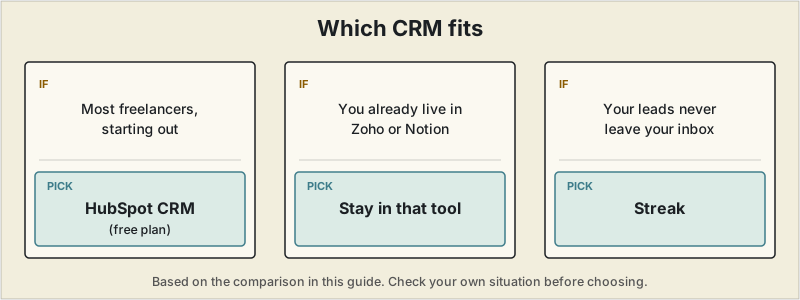
Short answer: HubSpot's free plan is the strongest starting point for most freelancers, with a real pipeline and email tracking and no time limit. If you already live in Zoho or Notion, staying there avoids another tool, and Streak fits if your lead process never leaves your inbox.
 A CRM sounds like overkill for a one-person business until the moment a warm lead from three months ago gets forgotten, or a past client who wanted to rehire you never gets a follow-up. A CRM is different from the project management tools freelancers usually reach for first — it tracks people and relationships before a project starts, not tasks after a client says yes. This guide covers the CRMs that actually fit a solo pipeline instead of a sales team's.
What a freelancer needs from a CRM
- A simple pipeline view — which leads are new, which are in conversation, which are close to signing
- Enough free contacts to not hit a wall after a year of freelancing
- Low setup time — a CRM you have to configure for a week before it's useful won't get used
- Some connection to email, since most freelance lead conversations happen there anyway
"Free" only counts if the contact limit doesn't quietly force an upgrade a year in — that's where a few of these tools differ more than the feature lists suggest.
Quick comparison
| Tool | Free plan | Contact limit | Standout feature | Best for |
|---|---|---|---|---|
| HubSpot CRM | Yes | Unlimited | Full pipeline + email tracking, genuinely free | Most freelancers wanting a real CRM at $0 |
| Zoho CRM | Yes, up to 3 users | Limited by plan | Connects to Zoho Invoice/Books if already using them | Freelancers in the Zoho ecosystem |
| Streak | Yes, solo plan | Limited | Lives entirely inside Gmail | Freelancers who manage leads mostly by email |
| Notion | Yes | Unlimited | Fully customizable, doubles as a client workspace | Freelancers who want one flexible tool, DIY setup |
| Pipedrive | No (paid only) | — | Purpose-built visual pipeline | Freelancers with a genuinely complex sales process |
HubSpot CRM — the strongest free option for most freelancers
HubSpot's free tier is unusually complete: unlimited contacts, a visual deal pipeline, email tracking that shows when a client opens your message, and a meeting scheduler, all with no time limit on the free plan. The learning curve is real — HubSpot is built to scale into a full marketing and sales platform, so a lot of what you see in the interface is aimed at teams, not solo freelancers. Most freelancers only need a fraction of what's available, but the core pipeline and contact features are genuinely usable without ever paying.
Best for: freelancers who want a proper CRM without paying, and don't mind a slightly bigger interface than they'll actually use.
Zoho CRM — the natural fit if you're already in the Zoho ecosystem
If you're using Zoho Invoice or Zoho Books (covered in our invoicing software guide), Zoho CRM connects to them directly, so a closed deal can flow into an invoice without re-entering client details. Used on its own, it's a reasonable free CRM, but the interface feels more scattered across modules than HubSpot's more unified pipeline view.
Best for: freelancers already using other Zoho products for invoicing or accounting.
Streak — the CRM that never leaves Gmail
Streak builds pipeline tracking, deal stages, and contact notes directly into the Gmail interface, so there's no separate app to check. For freelancers whose entire lead process already happens over email, that's a meaningful reduction in friction compared to switching between an inbox and a separate CRM tab. The trade-off: it's Gmail-only, and the free plan is solo-use only, so it stops working the moment you want to loop in an assistant or collaborator.
Best for: freelancers who live in Gmail and want pipeline tracking without leaving it.
Notion — the flexible, DIY option ✓ Actually used to run SoloStack
Notion isn't a CRM out of the box, but its free plan's unlimited pages and database views make it easy to build one — a client database with status, deal value, and next-follow-up-date columns takes under an hour to set up using a free template. Because it's fully custom, it can also double as the project workspace covered in our project management guide, keeping leads and active projects in one tool. The cost is that nothing is automated: no email tracking, no reminders unless you build them yourself.
Best for: freelancers who already use Notion for other things and don't mind assembling their own system.
Pipedrive — worth mentioning, but not free
Pipedrive is a purpose-built sales pipeline tool with a genuinely clean, visual interface, and it's frequently recommended for solo users specifically because of how little setup it needs. It doesn't have a usable free tier, though, so it's only worth the cost if your pipeline is complex enough — multiple deal stages, several active proposals at once — that a free option starts to feel limiting.
Best for: freelancers with a high enough lead volume that a free CRM's limits become a real bottleneck.
Do you actually need one?
If you're juggling more than four or five live leads at once, or you've ever forgotten to follow up with someone who said "maybe next quarter," a CRM pays for itself quickly even at zero leads lost. Below that volume, a simple spreadsheet is a completely reasonable substitute — the goal is not letting a warm lead go cold, and a CRM is just one way to make sure that happens.
Where to start
For most freelancers, HubSpot's free plan is the strongest starting point — a real pipeline and email tracking with no cost and no time limit. If you're already inside the Zoho or Notion ecosystem, staying there avoids adding a new tool. Streak is worth a look specifically if your lead process never leaves your inbox. If a lot of your pipeline happens over video calls rather than email, pairing your CRM with one of the AI meeting notetakers covered separately saves the manual step of writing up notes after every call.
Pricing, contact limits, and free-tier features change frequently across CRM tools. Confirm current details on each provider's site before committing to one.