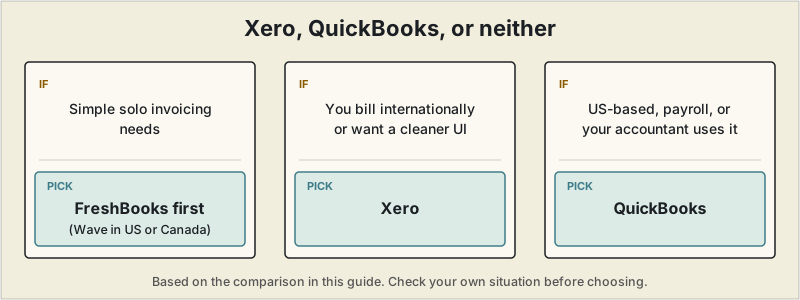
Short answer: if you are a solo freelancer with simple invoicing, both are probably more than you need: start with FreshBooks, or Wave if you are based in the US or Canada. If you have outgrown that, choose Xero if you bill internationally or want a cleaner interface, and QuickBooks if you are US-based, plan to run payroll, or your accountant already uses it.
 Xero and QuickBooks are the two accounting platforms that dominate this comparison once a business outgrows simple invoicing, and freelancers researching either one keep running into the same conclusion from independent reviewers: both are genuinely strong products, and neither is really built with a solo freelancer's simpler needs in mind. That's worth taking seriously before comparing features line by line.
The honest starting point
Full double-entry accounting — the core of what both platforms do — is built for businesses with real bookkeeping complexity: multiple revenue streams, inventory, employees, or investors who need standardized financial statements. A solo freelancer invoicing a handful of clients a month, with no inventory and no payroll, is paying for and navigating a lot of structure they may not need. Several independent comparisons published in 2026 make this point directly, typically pointing solo freelancers toward a lighter tool like FreshBooks or Wave instead (see our FreshBooks vs QuickBooks comparison and full invoicing guide). If you're specifically looking to move off Xero rather than choosing between these two, our Xero alternatives guide covers four lighter, cheaper options directly.
That said, if you specifically need proper double-entry books — because you're scaling past simple freelancing, working with an accountant who requires it, or operating in multiple currencies — here's how the two actually compare.
The switch from a simpler tool to something built around full double-entry accounting made the most sense once client work stopped being simple to reconcile by hand — spreadsheet-tracked exchange rates started disagreeing with what actually landed in the bank, and the gap between them, multiplied across a dozen invoices a month, made revenue genuinely hard to pin down. That's the same problem multi-currency handling in either of these platforms is built to solve — worth knowing before comparing their pricing structures.
Quick comparison
| Xero | QuickBooks Online | |
|---|---|---|
| Entry price | Early plan, ~$25/month | Simple Start, ~$35/month |
| Multi-currency | Strong, widely considered the stronger of the two | Available, generally considered less robust |
| Accountant/bookkeeper familiarity | Lower in the US specifically | Highest — the US accounting ecosystem is built around it |
| User interface | Frequently rated cleaner and easier to learn from scratch | More feature-dense, steeper initial learning curve |
| Payroll | Available, less deeply integrated in the US | Deeply integrated, especially for US-based W-2 employees |
| Best documented fit | International freelancers, agencies under 10 people, anyone prioritizing UX | US-based businesses running payroll, or already working with a QuickBooks-trained accountant |
Where Xero tends to win
Independent comparisons consistently rate Xero's multi-currency handling and general user experience above QuickBooks — a genuine advantage for freelancers billing clients in more than one currency (see our multi-currency accounting guide for the specifics). Xero's Early plan also starts cheaper than QuickBooks' equivalent tier, and reviewers describe it as the easier platform to pick up with no prior accounting software experience.
Where QuickBooks tends to win
QuickBooks' single biggest advantage isn't a feature — it's ecosystem depth. The vast majority of US accountants, bookkeepers, and third-party integrations are built around QuickBooks first, which matters enormously the moment you hand books to a professional or need a specialized app to connect. For US-based freelancers who plan to hire W-2 employees eventually, QuickBooks' payroll integration is also considerably more mature than Xero's.
Worth noting separately: QuickBooks Self-Employed is a distinct, cheaper product from QuickBooks Online, purpose-built for US sole proprietors — automatic Schedule C categorization and quarterly tax estimates — and shouldn't be confused with the full QuickBooks Online accounting suite discussed above.
A pricing trend worth knowing
Multiple 2026 comparisons flag that both platforms have raised prices meaningfully in recent years — QuickBooks by roughly 10-15% annually since 2023 with a further increase in 2026, and Xero's entry plan nearly doubling since 2021. Whichever you choose, expect the renewal price a year or two out to be higher than the promotional rate you sign up at.
How to choose
If you're a solo freelancer with simple invoicing needs, both of these are likely more than you need — start with FreshBooks, or Wave if you're US/Canada-based (it hasn't accepted signups from elsewhere since 2020), instead. If you've genuinely outgrown that and need real double-entry accounting, choose Xero if you bill internationally, value a cleaner interface, or don't already have an accountant with a strong QuickBooks preference. Choose QuickBooks if you're US-based, plan to run payroll, or your accountant already works in it — that ecosystem advantage tends to compound over time in a way a feature checklist won't fully capture.
This article is for general informational purposes and isn't financial or accounting advice. Pricing and features for both platforms change frequently — confirm current details directly with each provider, and consult a qualified accountant for guidance specific to your situation.
Frequently asked questions
Is Xero or QuickBooks cheaper for a freelancer?
Entry-level pricing is similar between the two, but neither is priced with a solo freelancer's simpler needs specifically in mind — both are built around small-business bookkeeping with more depth, and cost, than most freelancers actually use.
Can I switch from QuickBooks to Xero later without losing my data?
Both platforms support exporting financial data, but a full migration, especially historical transaction categorization, is rarely seamless. It's generally easier to pick carefully up front than to migrate later.
Do I need Xero or QuickBooks if I only use tax filing software?
If your bookkeeping needs are simple, a lighter year-round tracker paired with dedicated filing software (see our tax software guide) can cover the same ground for less than a full Xero or QuickBooks subscription.
Which is better for multi-currency freelance invoicing, Xero or QuickBooks?
Xero's multi-currency handling is generally considered stronger and more automatic than QuickBooks' — see our dedicated guide to accounting software for freelancers with international clients for the full comparison.