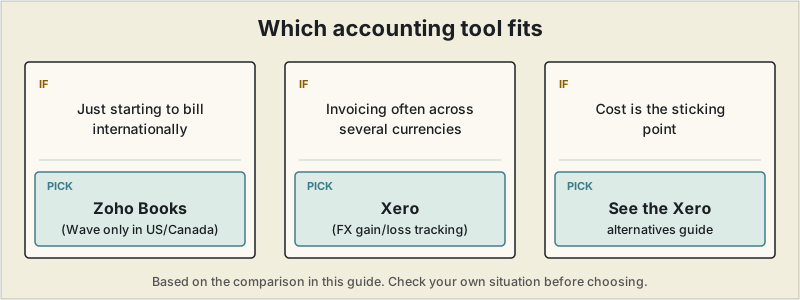
Short answer: when you are just starting to bill internationally, Zoho Books' mid-tier pricing is a reasonable start, or Wave's free plan if you are based in the US or Canada. Once you invoice regularly across several currencies and want accurate FX gain and loss tracking, Xero is the strongest option, though it costs more.
 Billing a client in euros while your expenses are in your home currency creates problems that domestic-only accounting software simply isn't built to handle — exchange rate tracking, foreign currency reporting, and gain/loss calculations when a client pays weeks after you invoice. This guide compares accounting platforms specifically on how well they handle multi-currency freelance work, not just general bookkeeping. If you want the actual mechanics of getting the exchange-rate math right — which rate to use, and at what date — before picking a tool, see our guide to tracking profit and loss in foreign currency.
What actually matters for cross-border freelancers
- How many currencies are supported, and how often exchange rates update (hourly vs. daily makes a real difference if you bill in a volatile currency)
- Automatic foreign exchange gain/loss tracking — without this, you're doing the math by hand at tax time
- Which plan tier multi-currency sits behind — several tools bury it in their most expensive plan
- VAT and cross-border tax handling, especially relevant for EU clients
This is the exact problem that pushed a switch away from a simpler, single-currency invoicing tool. Once invoicing crossed roughly ten times a month across dollars and euros, a spreadsheet tracking exchange rates by hand started producing a different revenue figure depending on whether the rate was checked at invoice time, at payment date, or after conversion fees — a gap of several percent each time, showing up as real, unexplained money on paper. What decided the switch wasn't the headline subscription price, but which plan tier actually included proper multi-currency handling — on more than one platform, that sits well above the entry price advertised on the homepage.
Interactive · trailing 12 months, live ECB data
How much has each currency actually moved this year
The 12-month range between each currency's high and low against USD, pulled from the same European Central Bank reference rates as the lookup tool above. A wider swing means more that gets left on the table — or clawed back — depending on when payment actually lands, if nothing is tracking it automatically.
Pulling a year of rates…
Rates are the European Central Bank's daily reference rates via the Frankfurter API, not any specific bank's or payment processor's actual rate.
Quick comparison
| Tool | Multi-currency plan required | Currencies supported | Starting price for multi-currency |
|---|---|---|---|
| Wave | Included free | Basic support | Free (US/Canada signups only — see note below) |
| Zoho Books | Standard plan | 25+ | ~$20/mo |
| FreshBooks | Plus plan | 150+ | ~$43/mo |
| QuickBooks Online | Essentials plan or higher | 145+ | Varies by region |
| Xero | Higher tiers | 160+, hourly FX updates | ~$29+/mo |
Wave — free, but only if you're based in the US or Canada yourself
Wave's free double-entry bookkeeping includes multi-currency invoicing, converting amounts back to your base currency for reporting — a genuine no-cost option for the freelancers who can actually sign up for it. That's the catch worth flagging clearly: Wave has restricted new account signups to businesses based in the US or Canada since November 2020. If you're freelancing from outside North America, Wave's own signup process now redirects you to Zoho Books instead, which makes Zoho Books (below) the more broadly relevant free-adjacent option for an article specifically about cross-border billing.
Best for: US- or Canada-based freelancers just starting to take on international clients who don't yet need advanced FX reporting.
Zoho Books — solid mid-tier option
Zoho Books includes multi-currency support (25+ currencies) on its Standard plan, along with bank feeds and recurring invoices. It fits well if you're already using other Zoho products, since the ecosystem connects CRM, project management, and invoicing tools together — though that same integration means more setup if you're starting from scratch.
Best for: freelancers already using Zoho's ecosystem, or those who want multi-currency without Xero's price tag.
FreshBooks — good for freelancers who want simplicity
FreshBooks supports multi-currency invoicing starting on its Plus plan, covering 150+ currencies. It's built primarily for service businesses and freelancers rather than complex multi-entity operations, so the interface stays more approachable than Xero's — at the cost of some of the advanced FX reporting features larger operations eventually need.
Best for: freelancers who want straightforward multi-currency invoicing without a steep learning curve.
QuickBooks Online — strong in the US, multi-currency costs more
QuickBooks is the most widely used platform among US accountants, which matters if you plan to hand off books to a bookkeeper or CPA eventually. The catch for international freelancers: multi-currency isn't available on QuickBooks's cheapest plans, so you'll need to step up to at least the Essentials tier. Once enabled, multi-currency can't be turned back off, which is worth knowing before you toggle it on.
Best for: US-based freelancers who want the easiest path to a CPA-ready tax filing, and don't mind paying more for multi-currency.
Xero — the strongest multi-currency handling overall
For freelancers who invoice heavily across borders, Xero is consistently the top pick for accuracy. It supports more than 160 currencies with exchange rates updating hourly rather than daily — a meaningful difference if you're billing in a currency that moves quickly — and it automatically tracks foreign exchange gains and losses, saving you from doing that math manually at tax time. The trade-off is price and complexity: Xero functions as full accounting software rather than a lightweight invoicing tool, and in the US specifically, it can be harder to find an accountant who's Xero-certified compared to the much larger pool of QuickBooks-trained bookkeepers.
Best for: freelancers who bill regularly in multiple currencies and want the FX math handled automatically, and who split time working across countries.
A word on VAT and cross-border tax rules
Multi-currency accounting software handles the math, but not the compliance questions — VAT obligations for EU clients, withholding requirements, and tax residency questions vary by country and aren't something any of these tools resolve on their own. If a meaningful share of your income comes from international clients, it's worth a one-time consultation with an accountant familiar with cross-border freelance income, even if you handle day-to-day bookkeeping yourself.
Interactive · live EU VAT rates
What's the VAT rate where your client is?
Current standard and reduced VAT rates for all 27 EU member states, pulled from the European Commission's own rate database. This shows the rate itself — whether you're the one who needs to charge it depends on B2B vs. B2C rules and your own registration status, which is exactly the kind of thing worth confirming with an accountant rather than guessing.
Loading current EU VAT rates…
Rates via the European Commission's Taxes in Europe Database (TEDB), served by the free VATComply API.
Checking the rate itself
The accountant conversation above is about whether and how VAT applies to your situation. The rate itself, at least, is a fact rather than a judgment call — and one that's easy to look up wrong from a stale blog post, since EU member states do revise rates. If you've specifically narrowed things down to Xero or QuickBooks, our dedicated Xero vs QuickBooks comparison covers that decision in more depth.
Which one fits
Freelancers just starting to bill internationally can reasonably start with Zoho Books' mid-tier pricing, or Wave's free plan specifically if they're based in the US or Canada themselves (Wave hasn't accepted signups from anywhere else since 2020). Once you're invoicing regularly across several currencies and want accurate FX gain/loss tracking without manual math, Xero is the strongest option available, even though it costs more than the alternatives — and if that cost is the sticking point, our Xero alternatives guide covers cheaper options directly. Getting the accounting right only matters if the rate behind those numbers is right in the first place — see our guide to pricing freelance work if you're not confident your rate covers what it should.
This article is for general informational purposes and isn't tax or legal advice. Multi-currency rules, supported currencies, and pricing tiers change frequently — confirm current details with each provider and consult a qualified accountant for your specific situation.
Frequently asked questions
Do I need dedicated multi-currency accounting software, or can I just convert manually?
Manual conversion works for the occasional international invoice, but once you're billing regularly in multiple currencies, manual tracking makes it very hard to see accurate profit and loss. Dedicated multi-currency support automates the FX gain/loss calculation that's easy to get wrong by hand.
Is Wave usable for a freelancer with international clients?
Only partially — Wave's free plan doesn't support full multi-currency accounting and, more importantly, has been restricted to US and Canada-based freelancers since 2020, so it's not an option at all for freelancers based elsewhere.
Which accounting software handles multi-currency best for freelancers?
Xero is generally considered the strongest option for accurate, largely automatic multi-currency handling among tools built with smaller businesses in mind, though it costs more than single-currency alternatives.
Does multi-currency accounting software handle VAT for EU clients automatically?
Not fully — most tools handle the currency conversion math but leave VAT registration thresholds, rates, and compliance rules to you or an accountant, since those vary by country and change independently of the accounting software itself.