When I went independent in 2023, the first thing I built in Notion was a project tracker. It was a single table: project name, client, deadline, progress, and the next thing I needed to do. The point was to see where every job stood without opening email or chat first.
A simple table was enough for a while. Once projects started to overlap, I noticed I could overlook work that was waiting on a client's confirmation or that was due soon. Sorting the table by status and deadline fixed most of that. Later I used the same workspace to plan articles and to keep track of the tools I was reviewing for SoloStack.
Where the single table stopped working
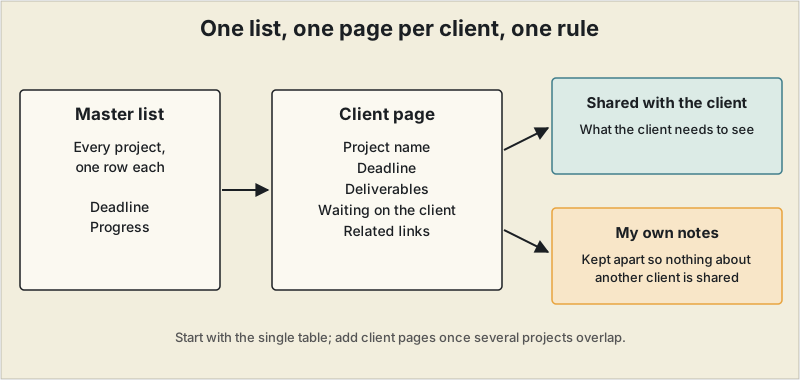
In 2025 the information for my client projects had spread across email, chat and documents. Checking the progress of one project meant opening several places, and the work itself sat in different states at once: delivered, waiting for the client's confirmation, and waiting for me to revise. One table could not hold the detail for each client, so I added two things on top of it: a page for each client, and a master list that covers all of them. The structure comes down to three questions.
What belongs on the master list?
Every project, one row each, with its deadline and its progress, so I can see all deadlines and statuses in one view. The earlier version of this table also carried the client and the next action, and I would keep both. The master list answers "what needs attention today," and nothing else.
What belongs on a client page?
Only what that project needs: the project name, the deadline, the deliverables, anything waiting on the client's confirmation, and the related links. Having it all on one page removed most of the time I used to spend going back through email and shared materials to find what a project needed.
What should a client see?
I keep what I share with a client apart from my own notes. The point is simple: nothing about another client should be visible by accident. Decide this when you create the first client page, not after you have a dozen.
If you want to try this
These are suggestions, not part of my own experience:
- Start with the single table and only the columns you actually check every day. Extra fields make the table tedious to keep up to date.
- Add a client page once several clients' work overlaps and one table can no longer hold the detail.
- Make the sharing rule before you share anything.
What it costs
Notion's Free plan is usable for solo work, which is enough to build everything above. Two limits matter for client pages: file uploads are capped at 5 MB per file, and page history is limited to 7 days. The Plus plan is $10 per seat per month when billed annually, with monthly billing shown at about $12. Prices and limits are as checked against Notion's pricing page on October 22, 2026, and the monthly figure should be reconfirmed at checkout.
When Notion is not enough
If clients need a login-protected portal, or invoicing and e-signature built in, compare dedicated tools in our client portal software guide. For how Notion stacks up against other project tools, see Notion vs ClickUp and our free project management tools.
The statuses and the sharing I use
On the master list my statuses are: under discussion, quote sent, contracted, in progress, waiting for confirmation, revising, delivered, invoiced, paid, and on hold or closed.
I share a client's page with a page-level link, limited so that my project list and other clients' information are not visible. A page link can expose more than you intend if the setting is wrong, so before sharing I open it in another browser, or while logged out, to see what an outsider sees.
Bottom line
Start with one table. Add a page for each client when one table can no longer hold the detail, and decide what a client can see before you share anything. The structure matters more than the tool.
This is one freelancer's setup and will not fit every kind of work. Notion changes its plans and limits from time to time, so confirm current pricing on its site.
Frequently asked questions
How do I organize freelance client work in Notion?
Use a master list with one row per project, showing its deadline and progress, and give each client a page with the project name, deadline, deliverables, items waiting on the client's confirmation, and related links. Keep your own notes apart from anything you share with the client.
Can I manage clients on Notion's free plan?
For solo work the Free plan is usable. The limits to know are a 5 MB cap per uploaded file and 7 days of page history, as checked on October 22, 2026. Confirm current limits on Notion's pricing page.
How do I stop one client's information from being shared with another?
Keep the page you share with each client separate from your own notes, and do not put information about other clients on any shared page. Decide this when you create the first client page.