Short answer: don't panic, and rebuild what is missing from other records before you give up on a receipt: your bank or card statement, the confirmation email, and the billing history in the service's own dashboard. Then fix the cause by saving every receipt at the moment it arrives and checking them once a month. Rules on what counts as evidence differ by country, so check your tax authority's requirements.
What happened to me
When I prepared my 2024 tax return, three receipts were missing. I had been keeping emailed receipts, paper receipts, and the billing histories inside each service's dashboard in separate places, and I only started looking when I needed them. I couldn't tell where I had saved things, and confirming what I had took far longer than it should have.
Step 1: rebuild what is missing
For each missing receipt, look for another record of the same purchase: the bank or card line, the confirmation email, or the vendor's billing page. If the vendor offers it, ask for a reissued receipt or invoice. Write down the date, amount and what it was for while you have it in front of you.
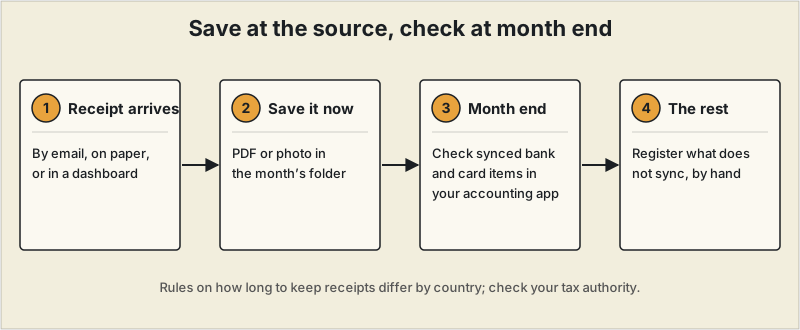
Step 2: save it at the source
What I do now is save a PDF or an image the moment a receipt arrives, into a folder for that month. It takes seconds at the time and removes the search later.
Step 3: check once a month
Transactions that sync with my accounting software from my bank or card are checked there. The ones that don't sync get registered by hand at month end. Doing this monthly means a missing receipt is noticed while it can still be replaced, not at filing time.
For a comparison of tools that can automate part of this, see our guide to receipt scanning apps, and for the filing side, tax software for freelancers.
What I do now
I used to leave receipts downloaded from email in my computer's Downloads folder, and when I started on my tax return I couldn't find the ones I needed and lost a lot of time. Now I keep an "Expenses" folder on Google Drive with a subfolder for each month (such as 2026-01), and I name each file date, service and amount, for example 2026-01-15_ServiceName_Amount.
Of the three that were missing, two could be downloaded again from the provider's account page, and for the third I asked the seller to reissue it. Since then I save a receipt the day it arrives. Gathering them all in one batch at the end of the month didn't suit me.
This describes my own routine, not tax advice. Record-keeping rules depend on your country, so check what your tax authority requires.
Frequently asked questions
What if I can't find a receipt at all?
Look for other records of the same purchase: your bank or card statement, the confirmation email, and the billing history inside the service's own dashboard. Many vendors will also reissue a receipt or invoice on request. Rules about what counts as acceptable evidence differ by country, so check your tax authority's guidance.
Do I need to keep paper receipts?
That depends on where you file taxes. Some tax authorities accept scanned or photographed copies and others have specific retention periods. Check the requirements that apply to you before throwing paper away.
Which tool should I use to keep receipts?
Start with a routine that you will actually follow, such as a folder per month, and add a tool only if it removes work. Our guide to receipt scanning apps compares the options.