Short answer: for reasonably simple 1099 income, FreeTaxUSA delivers the accuracy of premium filing software for a fraction of the cost. Pair a filing tool with Hurdlr or QuickBooks Solopreneur if you want your tax liability tracked continuously, and reach for TurboTax or FlyFin when the extra guidance or CPA access is worth paying for. Filing as a freelancer means Schedule C for business income and expenses, Schedule SE for self-employment tax on top of regular income tax, and — for most freelancers — quarterly estimated payments throughout the year rather than one bill in April. Generic tax software handles some of this reasonably well; freelancer-specific tools go further, tracking expenses and estimating quarterly taxes automatically all year rather than scrambling every April. This guide (written with US freelancers in mind, since self-employment tax rules and forms are US-specific) compares both categories.
What actually matters for a freelancer's tax software
- Real Schedule C and Schedule SE support — not every "self-employed" label actually walks you through both forms cleanly
- Quarterly estimated tax calculations — ideally updated as your income changes through the year, not a single guess made in January
- Deduction discovery, especially for expenses freelancers commonly miss (home office, a portion of internet/phone bills, software subscriptions, mileage)
- Whether it's a year-round tracker or just a once-a-year filing tool — these solve different problems and many freelancers end up needing both
The habit that changed the most after going independent was checking what a "free" tier actually excludes before comparing anything else — tax software is one of the categories where that gap shows up fastest. The bigger lesson came from two separate scares. The first year, filing felt like the finish line — return submitted, done for the year — until a notice a few months later was a reminder that quarterly estimated payments are a separate, ongoing obligation, not something a single annual filing covers. Two payments a year, around $1,000 each, and the actual scare wasn't the amount — revenue easily covered it — it was that none of it had been set aside in a separate account, so the balance sitting in the business account looked more spendable than it actually was. A separate year, going back through expenses at filing time turned up several months of unrecorded software subscriptions — small enough individually to keep deferring, but close to $1,000 for the year once added up. Since then, tax software isn't just a once-a-year filing tool; thirty minutes at the end of every month goes to checking revenue, expenses, profit, what's been set aside for taxes, and any receipts that haven't been logged yet, with a portion of every payment moved into a separate tax account as it arrives. Filing in April got easier as a side effect, but that was never really the point.
Quick comparison
| Tool | Type | Federal filing cost | Standout feature | Best for |
|---|---|---|---|---|
| FreeTaxUSA | Filing (once a year) | Free (state ~$15) | Full Schedule C/SE support at no cost | Straightforward freelance income on a budget |
| TurboTax Self-Employed | Filing (once a year) | Paid, premium pricing | Most guided, most hand-holding | Freelancers who want maximum guidance and live support |
| QuickBooks Solopreneur | Year-round tracker | N/A (pairs with TurboTax) | Automatic GPS mileage tracking | Freelancers who drive for work and want it tracked automatically |
| Hurdlr | Year-round tracker | N/A (exports to a filing tool) | Real-time quarterly tax estimates | Freelancers who want to stop guessing what to set aside |
| FlyFin | Year-round tracker + filing | Paid | AI-driven deduction finder, CPA access included | Freelancers who want deductions found for them |
FreeTaxUSA — the best value for straightforward situations
FreeTaxUSA offers completely free federal filing including Schedule C and Schedule SE, with state filing priced around $15. For a freelancer with one or two 1099s and relatively simple deductions, it covers the same IRS forms and validation logic as much pricier competitors — the calculations aren't "less accurate" for being free, just less hand-held. What you lose compared to TurboTax is guided explanations at every step and live support if you get stuck.
Best for: freelancers with straightforward income who are comfortable filing with less guidance in exchange for a much lower cost.
TurboTax Self-Employed — the most guided option, at a premium price
TurboTax remains the most heavily guided option in this category, walking through self-employment tax step by step with plain-language explanations and, on higher tiers, live access to a tax professional. It also connects directly to QuickBooks Solopreneur, so a freelancer using both products all year gets pre-populated numbers at filing time instead of re-entering everything. That convenience comes at the highest price point of the group, for calculations that ultimately use the same IRS forms as cheaper alternatives.
Best for: freelancers who want maximum hand-holding and are willing to pay for it, especially in their first year or two of self-employment.
QuickBooks Solopreneur and Hurdlr — the year-round trackers
Filing software solves one moment; a year-round tracker solves the other 11 months, where the real risk is under-saving for quarterly payments or missing deductions because a receipt got lost in April. QuickBooks Solopreneur's standout is automatic GPS mileage tracking through its mobile app — it detects trips and lets you swipe to categorize them as business or personal, which matters if mileage is a meaningful deduction for your work. Hurdlr's focus is sharper: real-time quarterly tax estimates based on actual income and expenses as they happen, so the quarterly payment isn't a guess. Neither of these files your actual return — both export to a filing tool (TurboTax for QuickBooks, any filing software for Hurdlr) at tax time.
A separate scare came from time tracking rather than expenses. Logging hours was consistent enough to invoice by at first, then quietly tapered off over the following year — no single decision to stop, just fewer entries until there weren't any. It only became a real problem at filing time: trying to reconcile that year's revenue against the prior year's breakdown meant needing to know which client or project each chunk of income had actually come from, and without logged hours there was no way to reconstruct it — just a lump sum with no paper trail behind it. A better tool wasn't the fix; a fixed weekly slot on the calendar was, a short review before closing out for the week to log what had actually been worked on, rather than trusting the habit to hold on its own.
Best for: freelancers who want their tax liability tracked continuously through the year rather than estimated once and hoped for.
FlyFin — AI deduction-finding with CPA access included
FlyFin scans connected bank and card transactions to flag potential deductions automatically, aiming to catch write-offs a freelancer might not think to look for. Its paid tier includes unlimited CPA consultations, which is a meaningful inclusion if you'd otherwise pay separately for professional advice on an unusual deduction or a multi-state situation. It's priced accordingly, and like any automated deduction finder, the suggestions are worth a sanity check rather than blind trust — especially for anything aggressive.
Best for: freelancers who want deductions actively surfaced for them and value having CPA access bundled in.
A rule of thumb that survives any tool
Regardless of which software you use, set aside 25–30% of every payment for taxes in a separate account the moment it arrives. This single habit prevents the most common freelance tax problem — a large, unexpected bill in April — far more reliably than any software feature. Tax software handles what you owe on income already earned; it's worth also thinking about what protects you if a client disputes that work in the first place — see our business insurance guide for what a professional liability policy actually covers.
What I use for my own books
I keep my own books in Money Forward Cloud, a Japanese service, with my bank and card statements imported to cut down on missed entries. I used to gather receipts in batches and reconcile statements against the books just before filing, which was a burden. Now I record transactions when they happen and review at month-end.
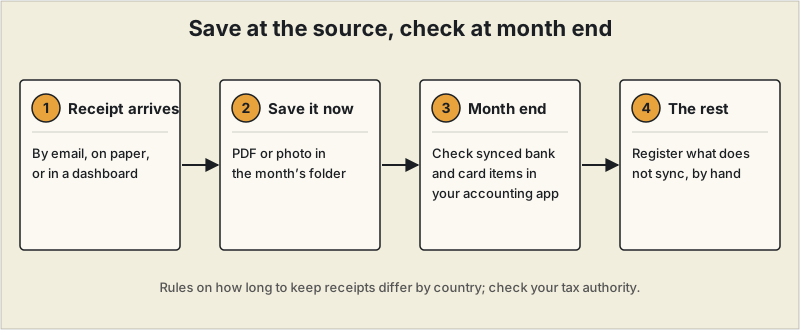
The tools compared on this page are US-focused and are researched from each provider's own pages, not tools I use myself. What I carry over from my own setup is what I weighed when choosing: bank and card sync, automatic journal entries, receipt storage, and filing support. For me the value of accounting software is less the filing itself than seeing my revenue and expenses clearly week to week.
Where to start
For most freelancers with reasonably simple 1099 income, FreeTaxUSA delivers the same accuracy as premium filing software for a fraction of the cost. If you specifically want your tax liability tracked continuously rather than estimated once a year, pair a filing tool with Hurdlr or QuickBooks Solopreneur. Reach for TurboTax or FlyFin specifically when the extra guidance or CPA access is worth paying for — a genuinely complex year, a first year self-employed, or simply wanting the peace of mind. None of this works without clean records feeding into it — see our receipt scanning apps guide if capturing expenses as they happen, rather than at tax time, is the part you're still doing manually.
This article is for general informational purposes and isn't tax advice. It's written with US freelancers in mind — self-employment tax rules and forms differ significantly outside the US. Tax rules, deduction rates, and software pricing change frequently; confirm current details with the IRS or a qualified tax professional for your specific situation.