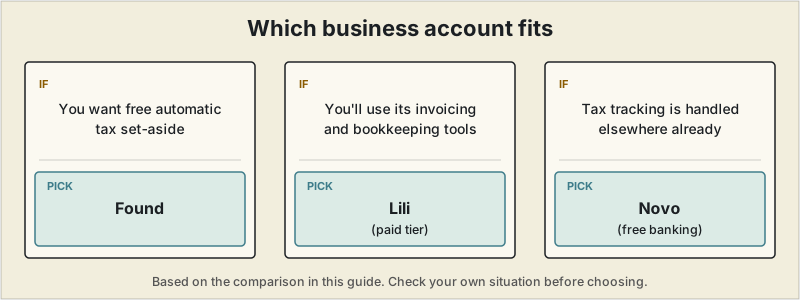
Short answer: Found is the strongest default for most freelancers, thanks to free automatic tax set-aside and 1099 handling. Choose Lili if you will use its invoicing and bookkeeping tools enough to justify a paid tier, and Novo if tax tracking is handled elsewhere and you want free banking with strong integrations.
 A mixed personal-and-business bank account is one of the quietest ways freelance income gets harder to manage than it needs to be — every incoming payment has to be manually sorted from personal spending before it means anything for taxes or cash flow. A dedicated business banking app fixes the sorting problem automatically, and the newer freelancer-focused ones go further: setting aside estimated taxes from every deposit as it lands, rather than leaving that math for April.
The first year of freelancing ran on a single mixed account, on the logic that revenue coming in meant it was fine to spend from — until tax prep meant going through roughly a hundred transactions a month, manually deciding which were client income, rent, groceries, software subscriptions, or a personal purchase. One recurring charge in particular took real digging just to remember what it even was. Sorting it all out took about six hours. Splitting into a dedicated business account the following year — client payments in, expenses paid from there, a fixed transfer to a personal account on a set day each month — turned that six hours into a glance at a balance. The bigger change wasn't the time saved at tax time; it was finally seeing that revenue and spendable money aren't the same number once taxes, tools, and other costs are accounted for. Separating the accounts is what made it possible to actually see that gap.
What actually matters for a freelancer's business bank account
- Whether tax set-aside happens automatically — some apps calculate and reserve a percentage of every deposit for estimated taxes in real time, rather than leaving it as a manual habit
- Whether the free tier is genuinely usable, or whether the tax and bookkeeping features that make these apps worth switching to are locked behind a paid tier
- 1099 contractor handling, if you ever subcontract work out yourself — collecting W-9s and filing 1099-NEC forms is a real time cost these apps can automate
- What it doesn't do — none of these are a substitute for an accountant on anything complex, and interest rates and fee-free ATM access vary more than the marketing pages suggest
Quick comparison
| App | Monthly cost | Automatic tax set-aside | 1099 contractor tools | Best for |
|---|---|---|---|---|
| Found | $0 (Found Plus/Pro optional, paid) | Yes, on every deposit | Yes — W-9 collection and 1099-NEC filing included | Freelancers who want tax automation without paying for it |
| Lili | $0 (Core); $15-55/month for paid tiers | Tax tools tier-locked (Pro and above) | Limited | Freelancers who also want built-in invoicing and a highest-yield savings option |
| Novo | $0, single plan | No built-in tax set-aside | No | Freelancers who mainly want free banking with strong app integrations (Stripe, QuickBooks) |
Found — the most tax automation for free
Found is built specifically around the self-employed, and its standout feature is doing the thing most freelancers mean to do manually and don't: automatically categorizing expenses, estimating tax liability in real time, and setting aside a percentage of each deposit for quarterly taxes — all on the free plan. It also handles 1099 contractor payments, including W-9 collection and 1099-NEC filing, which matters if you ever bring in help. The optional paid tiers (Found Plus and Found Pro) mainly add a higher-yield savings rate rather than gating the core tax automation behind a paywall.
Best for: freelancers who want the tax-set-aside habit automated without paying a monthly fee for it.
Lili — the strongest all-in-one, once you're on a paid tier
Lili started as a freelancer-focused app and has grown into a broader small-business platform, with four tiers from a free Core plan up to $55/month Premium. The free tier covers basic business checking and a competitive savings account (up to 4.00% APY on larger balances), but the features that make Lili distinctive — tax preparation tools, AI-driven expense categorization, and unlimited invoicing — sit behind the Pro ($15/month) tier and above. For a freelancer who'd use invoicing and tax tools enough to justify the fee, that bundle can replace a separate invoicing subscription; for anyone who just wants free banking, Found or Novo cover that without the monthly cost.
Best for: freelancers who want banking, tax prep, and invoicing bundled into one paid subscription rather than assembled from separate tools.
Novo — free banking with the deepest integrations
Novo's single free plan skips built-in tax automation entirely, betting instead on integration depth — direct connections to Stripe, QuickBooks, and Shopify, plus features like faster access to Stripe payouts through Novo Boost. For a freelancer who already has a separate accounting tool handling tax estimates (see our tax software guide) and mainly wants a genuinely free account with good app connections, Novo covers that without pushing an upsell.
Best for: freelancers who already have tax and bookkeeping handled elsewhere and mainly want free banking that connects cleanly to the tools they use.
A note on cash deposits and FDIC coverage
None of these three accept cash deposits directly (Novo and Found don't at all; check Lili's current policy, which has varied by tier) — a real limitation if any part of your income arrives as cash. All three are fintech companies, not banks themselves, with actual deposits held at an FDIC-insured partner bank; coverage limits and the specific partner bank are worth checking directly on each provider's site since they occasionally change.
If you're still undecided
For most freelancers, Found's free automatic tax set-aside and 1099 handling make it the strongest default — genuinely useful tax automation without a monthly fee attached. Choose Lili specifically if you'd also use its invoicing and bookkeeping tools enough to justify a paid tier, and Novo if you already have tax tracking handled elsewhere and just want free banking with strong integrations. Keeping business and personal spending separate only solves half the problem — see our receipt scanning apps guide for the other half: capturing deductible expenses as they happen.
This article is for general informational purposes and isn't financial, tax, or legal advice. These are fintech platforms, not banks — deposits are held at an FDIC-insured partner bank, and terms vary by provider. Fees, APY rates, and included features change frequently; confirm current details directly on each provider's site.
Frequently asked questions
Found or Novo for freelancers: which should I pick?
Pick Found if you want tax set-aside done for you: it estimates tax and reserves a percentage of every deposit on its free plan, and it handles W-9 collection and 1099-NEC filing. Pick Novo if tax tracking is already handled elsewhere and you mainly want free banking that connects to Stripe, QuickBooks or Shopify. Both have a free tier, so the decision is mostly about whether you want tax automation built in.
Which of these gets money to freelancers fastest?
Speed depends on where the money comes from. Novo offers faster access to Stripe payouts through Novo Boost, which is the closest thing in this group to an instant-deposit feature for Stripe income. Found and Lili focus more on organizing and setting aside what arrives than on accelerating it. Transfer speeds and eligibility change, so confirm the current terms with the provider before choosing on speed alone.
Can I deposit cash into Found or Novo?
Neither Found nor Novo accepts cash deposits directly. Lili's policy has varied by tier, so check its current terms. If part of your income arrives as cash, that is worth settling before you move your business banking.
Are Found, Lili and Novo actual banks?
No. They are fintech companies, and the deposits are held at an FDIC-insured partner bank. Coverage limits and the specific partner bank are worth checking on each provider's site, since they can change.