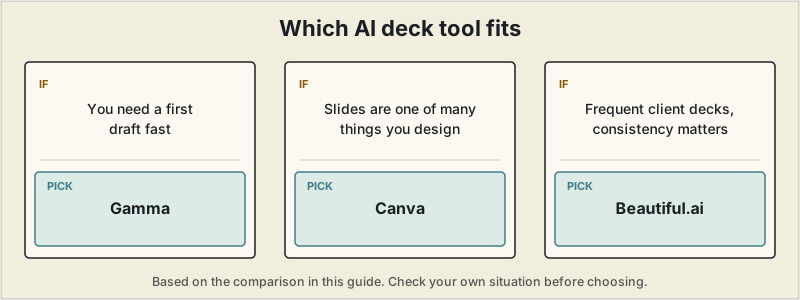
Short answer: start with Gamma for the fastest first draft, stay in Canva if slides are one of several things you already design there, and consider Beautiful.ai once client-facing decks are frequent enough that visual consistency is worth paying for. Treat any tool's output as a draft to edit hard.
 A prompt-to-deck AI tool can get a client pitch from blank page to a genuinely presentable first draft in under a minute — the honest consensus across independent testing in 2026 is that these tools get you roughly 70% of the way to a finished deck, not 100%. For a freelance consultant, that's still a real change: the blank-canvas hour that used to go into picking a template and placing text boxes now goes into the 30% that actually matters — sharpening the argument, cutting the slide nobody needs, making sure the numbers on slide 6 don't contradict slide 2.
Quick comparison
| Gamma | Canva | Beautiful.ai | Plus AI | |
|---|---|---|---|---|
| Best for | Fastest first draft from a prompt | Slides as one of many design needs | Consistent, on-brand client decks | Staying inside PowerPoint or Google Slides |
| Starting paid price | $9-10/month (Plus) | ~$18/month (Pro, monthly billing) | ~$12/month (Pro) | ~$10-20/month |
| Free tier | Yes — 400 one-time credits, not monthly | Yes, genuinely usable and ongoing | No standalone free plan | No — trial only |
| PowerPoint/Slides native | No — web-based, PPTX export has real fidelity limits | Exports to PPTX, web-first tool | No — web-based | Yes — generates directly inside PowerPoint or Google Slides |
| Design philosophy | Speed — a complete draft from one prompt | Flexibility — huge template and asset library | Enforced consistency — a rules engine, not a blank canvas | Fits into an existing corporate template |
Where Gamma wins
Gamma's entire pitch is speed: describe the topic, and a complete deck — layout, text, and images — comes back in well under a minute, consistently rated the fastest first-draft generator in this category. For a consultant who needs a rough pitch structure to react to and edit rather than stare at a blank page, that head start is worth more than any single design feature. The catch worth knowing before relying on the free plan: Gamma's 400 free credits are a one-time lifetime allocation, not a monthly refresh — most first-time users burn through a meaningful chunk in a single hour, and two or three decks is enough to hit the paywall. PowerPoint export quality is also a real, frequently-flagged limitation if a client specifically needs an editable .pptx rather than a link to a web-based deck.
Best for: consultants who want the fastest possible path from a rough idea to a structured first draft, and don't need pixel-perfect PowerPoint export.
Where Canva wins
Canva's Magic Design generates a full deck from a topic or an uploaded document, backed by the same enormous template and asset library that powers the rest of Canva's platform — genuinely useful if a pitch deck is one of several deliverables in a client engagement (a one-pager, social assets, a proposal cover). Its free plan is one of the more usable ongoing ones in this category, not just a limited trial. The trade-off is a recognizable "Canva aesthetic" that a design-conscious client may clock immediately, and AI depth that's shallower than a purpose-built tool like Gamma — Canva added AI generation on top of an existing design platform, rather than building the platform around it.
Best for: consultants who already use Canva for other client materials and want one subscription covering all of it.
Where Beautiful.ai wins
Beautiful.ai solves a different problem than speed: its "Smart Slide" engine enforces real design rules — spacing, alignment, visual hierarchy — on every slide automatically, so it's structurally difficult to produce a cramped or inconsistent-looking deck even when editing quickly under deadline pressure. For a consultant sending multiple decks to multiple clients, that consistency compounds — every pitch looks like it came from the same considered, professional source, without needing real design skill to get there. The trade-off is the flip side of the guardrails: less pixel-level freedom than a blank-canvas tool, and no free plan to test it on a real deck first.
Best for: consultants who send enough client-facing decks that visual consistency across them is worth paying for specifically.
Where Plus AI wins
Plus AI skips the "new platform" problem entirely by generating slides directly inside PowerPoint or Google Slides rather than a separate web app — a meaningful advantage if a client's own team works natively in one of those tools and expects an editable file back, not a link. It reads existing brand templates and generates within that structure, which avoids the file-format and fidelity issues that come up exporting from a web-first tool like Gamma. The trade-off is a narrower visual toolkit than a standalone design platform, and no free tier beyond a trial.
Best for: consultants whose clients specifically expect a native, editable PowerPoint or Google Slides file rather than a web-based deck.
What actually changes with a client pitch specifically
The habit that's changed the most since these tools got genuinely usable: the AI draft never goes to a client first. It goes through one pass checking that every number matches what's actually in the proposal, that the argument holds up in the same order a skeptical client would read it — problem, approach, proof, ask — and that nothing sounds like it was generated, which AI-drafted text reliably does until it's rewritten in an actual voice. The time saved doesn't show up as "less total time on the deck." It shows up as time reallocated — less spent placing text boxes, more spent making sure slide 4 doesn't quietly contradict the number on slide 7, which is the kind of mistake that costs real credibility in front of a client and is far more common in a rushed, hand-built deck than people expect.
Making the call
For a freelance consultant, the honest starting point is Gamma — it gets a rough pitch structure onto the screen faster than anything else here, which matters most in the earliest, most blank-page part of building a deck. If slides are one of several client deliverables already running through Canva, its AI generation is good enough to skip a separate subscription. And once client-facing decks are frequent enough that visual consistency itself becomes worth paying for, Beautiful.ai's enforced design rules solve a problem none of the prompt-to-deck tools are built to solve on their own. Whichever tool drafts it, treat the output as a strong starting point to edit hard, not a finished pitch to send as-is — see our proposal software guide for the document that usually needs to agree with whatever the deck claims.
Pricing, free-tier credit limits, and export quality across all four tools have changed multiple times in 2026 and are likely to change again. Confirm current plans directly with each provider before building a client deliverable around one.
Frequently asked questions
Beautiful.ai vs Canva: which is better for client pitch decks?
Beautiful.ai enforces design rules on every slide through its Smart Slide engine, so decks stay consistent even when edited quickly; it starts around $12 per month and has no standalone free plan. Canva is more flexible, with a large template library and a free plan that stays usable, starting around $13-15 per month for Pro, but it has a recognizable look and shallower AI than a purpose-built tool. Choose Beautiful.ai if you send enough client-facing decks that consistency is worth paying for, and Canva if slides are one of several things you design.
Gamma vs Beautiful.ai: what's the difference?
Gamma is built for speed: a complete deck from a prompt in well under a minute, starting around $9-10 per month, with 400 one-time free credits rather than a monthly allowance. Its PowerPoint export has real fidelity limits. Beautiful.ai is built for consistency instead, with a rules engine that keeps slides on-brand, and no standalone free plan.
What is the best AI presentation maker for a freelance consultant?
Gamma for the fastest first draft, Canva if slides are one of several things you design, and Beautiful.ai for consistent client-facing polish. If you need to stay inside PowerPoint or Google Slides, Plus AI generates directly there.